Explanation of Posture Setting
The shoulder setting describes the height and slope of each shoulder individually. This affects how the sleeve and shoulder seam sit on the wearer, as well as the overall balance and drape of the garment. Differences between shoulders are common, and adjusting for them ensures a more natural and comfortable fit.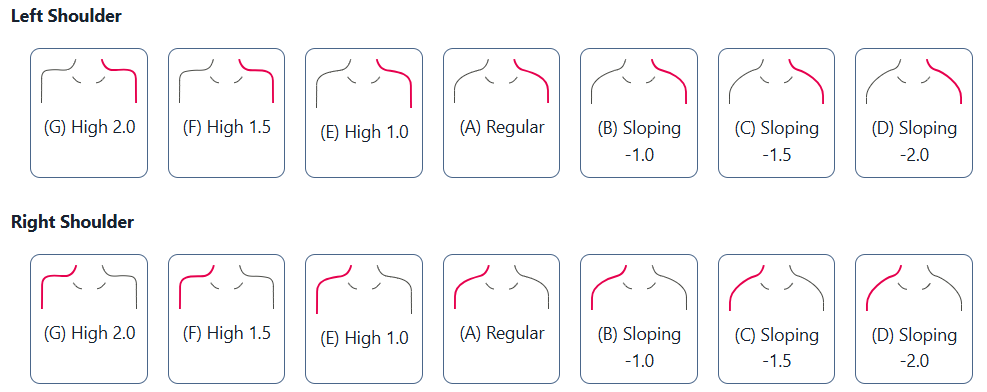
How to Determine
Observe the customer from the front and side views.
Note any difference in shoulder height or slope between the left and right side.
Look at how garments sit on the shoulder: rippling, drooping, or tightness can indicate uneven slopes.
Compare the customer in a fitted t-shirt and in a structured jacket to assess natural shoulder position.
Garments It Affects
This setting affects jackets, shirts, and coats. Adjusting each shoulder individually ensures the shoulder seam aligns properly and sleeves hang symmetrically.Options Available to Select
The slope options for each shoulder are measured in centimeters:
Left Shoulder:
High 2.0 (G)
High 1.5 (F)
High 1.0 (E)
Regular (A)
Sloping -1.0 (B)
Sloping -1.5 (C)
Sloping -2.0 (D)
Right Shoulder:
High 2.0 (G)
High 1.5 (F)
High 1.0 (E)
Regular (A)
Sloping -1.0 (B)
Sloping -1.5 (C)
Sloping -2.0 (D)
Tip: Consider using a shoulder level tool, available for purchase from MTM.Design, to measure and calculate the slope accurately before entering values into Studio.
Please note: this article is offered merely to explain the posture setting as described above. This is not meant to analyze or assess your customers during the measurement process. MTM.Design can help explain the setting but will not decide the choice for you and your brand.
Was this article helpful?
That’s Great!
Thank you for your feedback
Sorry! We couldn't be helpful
Thank you for your feedback
Feedback sent
We appreciate your effort and will try to fix the article