1. Explanation of Posture Setting
The stomach setting adjusts how the front balance and front panel of the garment accommodate the customer’s abdominal area. It helps ensure that the jacket or shirt hangs cleanly without pulling or flaring at the front. This setting should only be used when the customer’s stomach shape is clearly visible and affects the drape of the garment.
2. How to Determine
- View the customer from the side to assess the natural contour of the abdomen.
- Look for signs such as fabric tension or pull lines around the lower front button area when the customer is wearing a fitted jacket or shirt.
3. Garments It Affects
This setting affects jackets, shirts, and vests. It primarily influences the front balance, shaping of the waist, and how the lower front of the garment lays against the body.
4. Options Available to Select
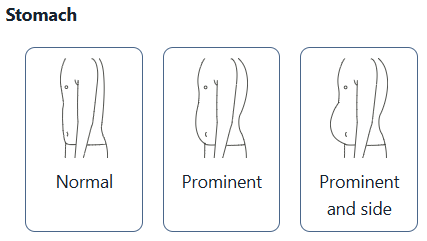
- Normal – Standard posture with no visible projection of the stomach area.
- Prominent – For clients with a forward-projecting abdomen that affects the hang of the front panel.
- Prominent and Side – For clients with a full stomach and wider sides, requiring additional balance and shaping across the front and side body.
Please note: this article is offered merely to explain the posture setting as described above. This is not meant to analyze or assess your customers during the measurement process. MTM.Design can help explain the setting but will not decide the choice for you and your brand.
Was this article helpful?
That’s Great!
Thank you for your feedback
Sorry! We couldn't be helpful
Thank you for your feedback
Feedback sent
We appreciate your effort and will try to fix the article